HTML widget (HtmlView)
HtmlView renders a static subset of HTML + CSS into a window (or any
2d-context target). There is no scripting and no network access: documents
are strings you pass in, and resources (images) resolve only through an
explicit allow-path.
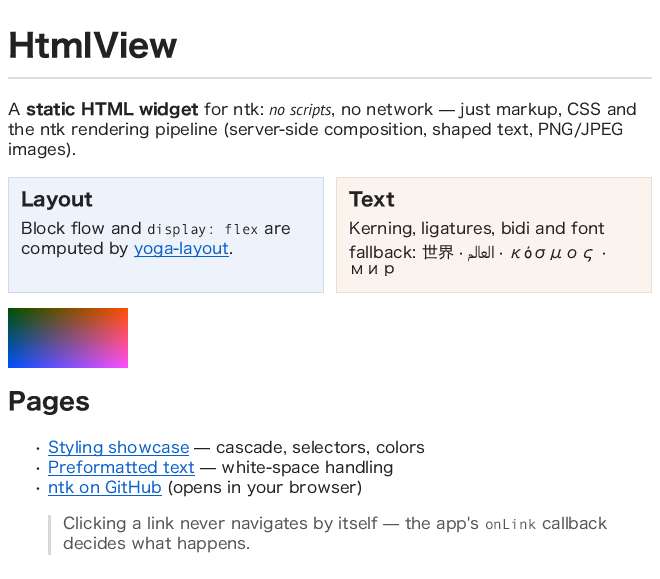
import { createClient, HtmlView } from 'ntk';

const app = await createClient();
const wnd = app.createWindow({ width: 640, height: 480, title: 'html' });
const view = new HtmlView(wnd, {
  onLink: (href, event, element) => console.log('clicked', href)
});
view.setHtml(`
  <h1>Hello</h1>
  <p>Some <b>markup</b>, a <a href="next.html">link</a> and CSS:</p>
  <div style="display: flex; gap: 10px">
    <div style="flex: 1; background: #eef">left</div>
    <div style="flex: 2; background: #fee">right</div>
  </div>
`);
wnd.map();
Layout is hybrid: block flow and flexbox boxes are computed by
yoga-layout (pure WASM, no
native modules); inline runs are shaped and wrapped by the ntk text pipeline
(TextLayout) — kerning, bidi, font fallback all apply. Parsing
uses htmlparser2, selector
matching css-select, stylesheet
parsing postcss. PNG/JPEG images
render through the image pipeline; SVG — inline or as an
<img> source — through the SVG widget.
The yoga-layout instance ntk uses is re-exported as Yoga
(import { Yoga } from 'ntk') so downstream layout consumers — e.g. the
react-x11 renderer — share the same WASM module and enum values instead of
loading a second, possibly version-mismatched copy.
The value parsers the CSS layer is built on are exported for the same
reason: cssColor(value) → premultiplied [r, g, b, a] floats 0..1,
which is what XRender wants (see context-2d.md), or
null; cssColorStraight(value) → the same colour with straight
alpha, for the callers that need unassociated components — OpenGL is
one (glClearColor and material colours take straight alpha, and
premultiplied values render translucent colours dark), and interpolating
two colours is another; premultiply([r, g, b, a]) converts, so a lerp can
happen in straight space and be scaled once at the end. And
cssLength(value, emBase, rootSize) → { px }, { pct }, 'auto' or
null.
The safety / responsibility model
The API is deliberately split so that a document can never act on its own:
- The app owns navigation. Clicking a link only calls
onLink(href, event, element). The widget never fetches or replaces documents; if you want navigation, callsetHtml()yourself with whatever the link should mean (seeexamples/html.js). - No network, no scripts.
<script>(and other active/embedded content: iframes, media, forms) is ignored.data:image URIs always work; any other image source loads only if you opt in:- pass
baseUrl— relativesrcthen resolves against it, restricted to localfile:reads, or - pass a
loadResource(url, { element })hook and implement any policy you like (return aBufferof encoded bytes, anImage, ornull). - pass
loadResource: nullto disable everything exceptdata:URIs.
- pass
- Malformed HTML/CSS never throws — unparseable constructs are skipped.
Constructor
new HtmlView(window, {
  theme,            // { family, size, color, background } base look
  stylesheet,       // string | string[] — extra author CSS (after <style>s)
  onLink,           // (href, event, element) => void
  onInvalidate,     // () => void — async content (an image) arrived
  baseUrl,          // path / file URL for relative image src resolution
  loadResource,     // custom resource loader, or null to disable
  fonts             // FontManager — only for windowless (standalone) use
})
In window mode the widget wires itself: renders on expose, re-wraps on
resize, scrolls with the wheel (X11 buttons 4/5), fires onLink on left
click. Standalone mode mirrors MarkdownView: pass null for the window
plus a fonts manager, then drive layout()/draw() yourself; pass
onInvalidate to re-layout/redraw when async content (an image) arrives —
window mode repaints on its own.
Methods
setHtml(html, { baseUrl })— parse and adopt a document (full documents or fragments;<style>elements are honored). Replaces the previous one, resets scroll, frees old resources.layout(width)→ content height — lay out for a container widthdraw(ctx, x, y)— draw the last layout onto any 2d contextrender()— window mode: full clear + layout-if-needed + drawlinkAt(x, y)→{ href, element }| null — link hit test (coordinates of the last draw)elementAt(x, y)→ DOM element | null — deepest element at a point (htmlparser2 node:.name,.attribs,.children,.parent)scrollBy(dy)/scrollTo(y)— window mode scrolling, clampedcontentHeight— after layoutdestroy()/Symbol.dispose— free yoga nodes and image uploads
Supported HTML
- structure:
html body div section article header footer nav aside main figure figcaption blockquote p h1–h6 hr br - text:
span a b strong i em u s strike del ins code kbd samp tt pre big small sub sup center(sub/sup render as smaller text, no baseline shift) - lists:
ul ol li dl dt ddwithdisc circle square decimal lower/upper-alphamarkers - tables:
table thead tbody tfoot tr td th— approximated as flex rows with equal-width cells (no content-based column sizing) - images:
imgwithsrc(PNG/JPEG/SVG),width/heightattributes,altplaceholder text while loading / on failure. SVG sources are detected by content sniffing (any of: file bytes, aloadResourcebuffer,data:image/svg+xmlURIs — base64 or percent-encoded) and rendered as vectors via SvgView - inline
<svg>: a replaced element, laid out like an image — intrinsic size fromwidth/height/viewBox(ratio-preserving shrink to the container), rendered by SvgView with its supported subset; adopted synchronously, so sizing is right on the first layout pass - dropped:
head style script title meta link template noscript iframe object embed audio video canvas input select textarea button
Supported CSS
Selectors: everything css-select supports — type/class/id, descendant,
>, +, ~, attributes, :first-child-style pseudo-classes. Cascade
uses standard specificity plus source order, !important, inline style
last; inheritance for text properties. @media blocks apply only when the
query is a bare screen/all (conditions are not evaluated).
| Group | Properties |
|---|---|
| box | display (block inline inline-block flex list-item none), width height min/max-*, margin* (incl. auto), padding*, border* (solid, per-side widths/colors), box-sizing is always border-box |
| flex | flex-direction flex-wrap justify-content align-items align-self flex-grow flex-shrink flex-basis flex gap row-gap column-gap |
| text | color font-family font-size font-weight font-style line-height text-align text-decoration white-space (normal pre nowrap) list-style-type |
| background | background-color (and the color of a background shorthand) |
Units: px pt em rem % and font-size keywords. Colors: named, rgb[a](),
hsl[a](), transparent, and hex in all four lengths including alpha
(#rgb, #rgba, #rrggbb, #rrggbbaa).
Not supported (silently ignored): floats, absolute/relative positioning,
grid, background images, border-radius, shadows, transforms, transitions,
generated content, tables' real column algorithm, inline images mid-text
(an <img> always becomes its own box, breaking the surrounding inline
run). Adjacent sibling margins collapse (the common case); parent/child
margin collapsing is not performed.
Theming
theme sets the root defaults — family, size (root rem base),
color, background (the window clear color). Everything else is CSS:
pass app-level rules via stylesheet, they cascade after document
<style>s at equal specificity.
const view = new HtmlView(wnd, {
  theme: { size: 15, background: '#fbfbf8' },
  stylesheet: 'a { color: #7a2048 } h1 { border-bottom: 1px solid #ddd }'
});
Images and relayout
Image loading is asynchronous. Boxes with width/height (attributes or
CSS) reserve space immediately; unsized images occupy 0×0 until decoded,
then the widget invalidates layout and re-renders automatically (window
mode). Decoded images upload to the X server once and are freed on
setHtml/destroy. Inline <svg> needs no loading at all; <img> SVG
sources go through the same asynchronous resolution as rasters but hold no
server-side resources (they redraw as vectors).